Hello, good afternoon.
We are trying to resolve a couple of issues we are experiencing with WebRotate 360 SpotEditor and would really appreciate your help.
Issue 1 (main issue)
We created a project and saved it without any apparent problems. However, after closing the program and trying to reopen the same project later, we get the following error:
“The input string was not in a correct format.”
We are not sure what could be causing this, since other projects open without any issues.
We are attaching the content of the .xml file so you can review it.
Issue 2
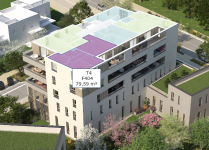
We would also like to know how to properly create hotspots using a polygon indicator, so that it behaves like the example shown below. We want it to function as a polygon hotspot with an indicator, not just a standard hotspot.
Thank you very much in advance.
Best regards.
We are trying to resolve a couple of issues we are experiencing with WebRotate 360 SpotEditor and would really appreciate your help.
Issue 1 (main issue)
We created a project and saved it without any apparent problems. However, after closing the program and trying to reopen the same project later, we get the following error:
“The input string was not in a correct format.”
We are not sure what could be causing this, since other projects open without any issues.
We are attaching the content of the .xml file so you can review it.
Issue 2
We would also like to know how to properly create hotspots using a polygon indicator, so that it behaves like the example shown below. We want it to function as a polygon hotspot with an indicator, not just a standard hotspot.
Thank you very much in advance.
Best regards.